25 October 2026
Your first simulation
Open the landing-gear drop test, press Simulate and read the result. A five-minute tour of the workbench with a model that has a clear answer.
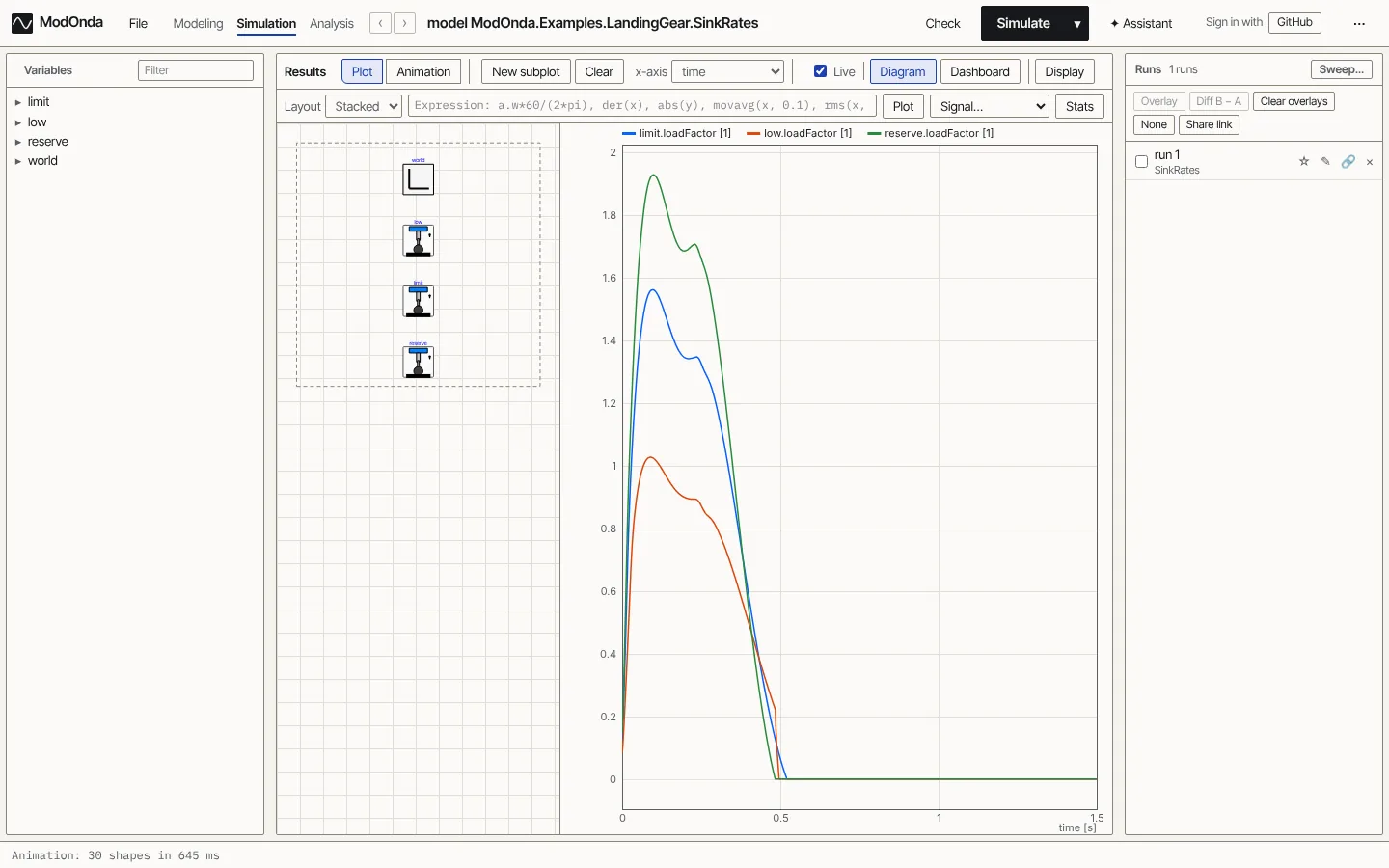
The quickest way to learn the workbench is to run one model and read its answer. This one is a landing-gear drop test, and it has a result you can check by eye: the harder the landing, the higher the load on the airframe.
Open the model
Open LandingGear.SinkRates. The address ends in the name of the class, so you can share it, bookmark it, or step back to the model you had before with the browser's Back button.
The Diagram tab shows three copies of one landing gear. Each one drops the same aircraft at a different sink rate:
| Drop | Sink rate |
|---|---|
low |
2.0 m/s |
limit |
3.05 m/s |
reserve |
3.66 m/s |
Each gear is a sprung mass on an oleo-pneumatic strut: a gas spring, an orifice that damps the stroke, seal friction and end stops, with the wheel on a tyre.
Simulate
Press Simulate (or Ctrl+Enter). The model is translated and solved in your browser, which takes about a second here. You stay on the model, and the plot strip under it fills with the result. Open Simulation in the header for the full view: the left pane becomes a variable browser, and the Animation tab replays the drop in 3-D.
Read the plot
In Simulation, open the Plot tab. In the variable browser, expand limit, low and reserve and tick loadFactor in each. The load factor is the force on the gear divided by the aircraft's weight.
The peaks are about 1.03 for the 2.0 m/s drop, 1.56 for the 3.05 m/s limit drop and 1.93 for the 3.66 m/s reserve-energy drop. The strut does not bottom out in the hardest of them.
Look at the same data another way
- New subplot adds a second plot below the first, and the x-axis list turns it into a parametric plot. Plot
limit.strut.F_strutagainstlimit.strut.xand you get the force-stroke loop of the strut. - Diagram next to the plot lets you click a component and plot its variables, without searching the list.
- Display converts units, including to imperial.
- The ▾ next to Simulate opens the run setup: stop time, solver and tolerance. The default is the model's own
experimentannotation.
A note on this model
LandingGear.SinkRates is one of six examples rebuilt from public engineering blog posts. The vendor models behind those posts are not public, so the parameter values are assumed and the example states them. The aim is the same physics and the same kind of result, not identical numbers. See the example library for the assumptions and the sources.
Where to next
- Workbench: every view and button.
- Live plots and dashboards: sliders that change a parameter while the model runs.
- 3-D animation: cameras, chase views and video recording.